
- RLinf图解-Framework 与 Single Controller
- RLinf图解-Channel 与 Worker 通信
- RLinf图解-Dynamic Scheduler
- RLinf图解-Workflow 与 Data
Channel作为 RLinf 中的常用通信组件,起到了组件间目的向串联功能,从而通过 channel 中的数据流动驱动 worker 的业务逻辑处理。同样 worker 本身分布在集群的各个节点上,本身也需要进行通信,那么他们实现的呢?本文将一探究竟。
1. Channel实现
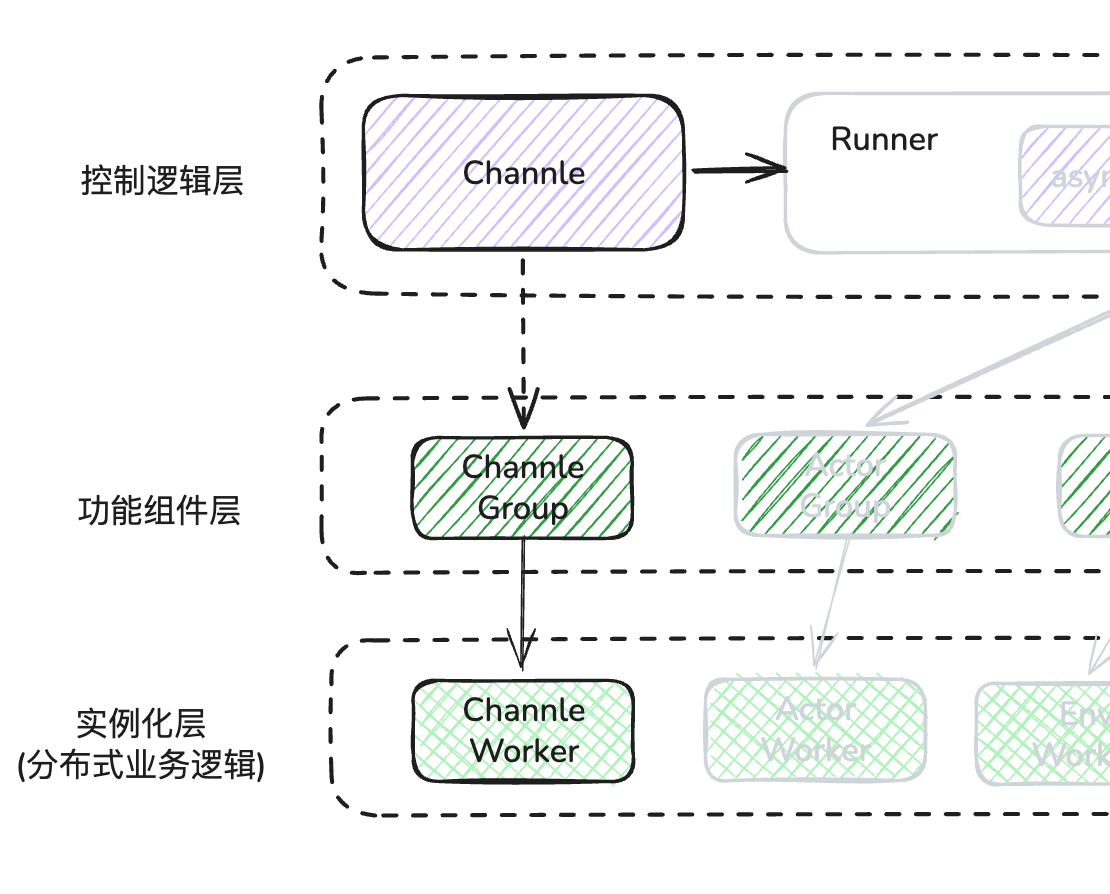
1.1 channel 创建
在上篇的runner 类初始化时,默认创建了3 个独立的 channel
self.env_channel = Channel.create("Env")
self.rollout_channel = Channel.create("Rollout")
self.actor_channel = Channel.create("Actor")
可以看到 channel 是通过静态类的 create 方法进行创建的,我们展开方法看一下
@classmethod
def create(
    cls,
    name: str,
    maxsize: int = 0,
    distributed: bool = False,
    node_rank: int = 0,
    local: bool = False,
    disable_distributed_log: bool = True,
) -> "Channel":
   if local:
      # Local channel does not need to be launched, just create a local channel object
      # 每个channel_name 都有一个PeekQueue(syncio.Queue) 协程 queue,只在本进程内传递信息
      local_channel = LocalChannel(maxsize=maxsize)
      channel._initialize(
          name,
          None,
          None,
          Worker.current_worker,
          local_channel=local_channel,
          maxsize=maxsize,
      )
      return channel

    # 跨进程
    if distributed:
        # 每一个node都放置一个worker,在大并发传输中使用这一能力
        placement = NodePlacementStrategy(node_ranks=list(range(cluster.num_nodes)))
    else:
        # 指定 worker 放置位置
        # Channel.create("xxxx") ChannelWorker会默认创建在 node_rank=0 的节点上
        placement = NodePlacementStrategy(node_ranks=[node_rank])
    try:
        # 创建worker
        channel_worker_group = ChannelWorker.create_group(maxsize=maxsize).launch(
            cluster=cluster,
            name=name,
            placement_strategy=placement,
            # Set max_concurrency to a high value to avoid large number of gets blocking puts
            max_concurrency=2**31 - 1,
            disable_distributed_log=disable_distributed_log,
        )
    except ValueError:
        Worker.logger.warning(f"Channel {name} already exists, connecting to it.")
        return cls.connect(name, Worker.current_worker)

    # 获得 worker 的逻辑 rank -> ray actor 实例引用
    # 当 Channel 需要执行一个操作(如 put 或 get )时,
    # 它可以直接通过这个字典找到对应的远程进程,而不需要每次都去遍历 WorkerGroup
    channel_actors: dict[int, ray.actor.ActorHandle] = {
        worker.rank: worker.worker
        for worker in channel_worker_group.worker_info_list
    }

    # 将分布式 Worker 组的物理资源与当前 Channel 对象的逻辑属性进行最终绑定
    channel._initialize(
        channel_name=name,
        # 支撑此通道数据传输的分布式 Worker 组
        channel_worker_group=channel_worker_group,
        # group 中的第一 worker 引用,用于执行一些非分发的全局查询
        channel_worker_actor=channel_actors[0],
        # 当前创建此 channel的worker引用
        current_worker=Worker.current_worker,
        maxsize=maxsize,
        channel_actors=channel_actors,
    )
    return channel
- L11:可以看到channel 创建判断是否指定 local node,如果是就直接创建LocalChannel,他只负责进程内的组件通信,使用异步队列存储消息,不能做进程外的分布式信息传递。
- L26:如果指定了 distrubuted 参数,那么会在每个 node 上都会创建一个 channel worker,这样在超大规模数据量传输时,就会通过负载均衡进行发送数据。
- L32:默认情况下,我们只会在 node_rank=0,也是就是第一个节点上创建channel worker,从这里可以看出,channel 其实也是一种特殊的 worker,遵循 worker 的基本通信机制
- L35:这里可以看到,channel 其实一组(1 - n) worker实例,那么真正传输依然是靠 worker 本身的通信能力,这部分后面会讲。
- L56: initialize 方法需要就是把目前收集到的信息赋值给类属性,方便后面其他方法使用,这里重要的几行如下。
def _initialize(
        self,
        channel_name: str,
        channel_worker_group: Optional[WorkerGroup["ChannelWorker"] | "ChannelWorker"],
        channel_worker_actor: Optional[ray.actor.ActorHandle],
        current_worker: Worker,
        local_channel: Optional["LocalChannel"] = None,
        maxsize: int = 0,
        channel_actors: Optional[dict[int, ray.actor.ActorHandle]] = None,
    ):
        self._channel_name = channel_name
        self._maxsize = maxsize

        # 支撑该通道的远程 Worker 组
        self._channel_worker_group = channel_worker_group
        # 主控制 Actor(通常是 Rank 0)
        self._main_channel_worker_actor = channel_worker_actor
        # 当前调用者的上下文标识(用于决定通信路径)
        self._current_worker = current_worker
        # 进程内通信的本地通道实例
        self._local_channel = local_channel

        # 根据 Actor 数量判定是否为分布式模式
        self._distributed = (
            len(channel_actors) > 1 if channel_actors is not None else False
        )
        # Rank 到物理 Actor 句柄的索引映射表
        self._channel_actors_by_rank = (
            channel_actors if channel_actors is not None else {}
        )

        # 确保主 Actor 始终在索引表中
        if (
            self._main_channel_worker_actor is not None
            and 0 not in self._channel_actors_by_rank
        ):
            self._channel_actors_by_rank[0] = self._main_channel_worker_actor

        # 路由缓存,用于加速 key -> rank 的查找
        self._key_to_channel_rank_cache: dict[Any, int] = {}

        # 如果是本地通道,记录其唯一 ID 并注册到全局 Map,以支持跨进程反序列化时找回对象
        if self._local_channel is not None:
            self._local_channel_id = id(self._local_channel)
            Channel.local_channel_map[self._local_channel_id] = self._local_channel
        else:
            self._local_channel_id = None
1.2 channel 连接
connect 允许任意角色的 worker 接入到目标 channel 中,这样就可以向这个 channel 发送或者接收数据了。
@classmethod
def connect(cls, name: str, current_worker: Worker) -> "Channel":
    from .channel_worker import ChannelWorker

    # 创建这个 channel 的 workers 引用,并封装成新的 worker group
    channel_worker_group = WorkerGroup.from_group_name(ChannelWorker, name)
    channel_actors: dict[int, ray.actor.ActorHandle] = {
        worker.rank: worker.worker
        for worker in channel_worker_group.worker_info_list
    }
    maxsize = channel_worker_group.execute_on(0).maxsize().wait()[0]

    channel = cls()
    channel._initialize(
        channel_name=name,
        channel_worker_group=channel_worker_group,
        channel_worker_actor=channel_actors[0],
        current_worker=current_worker,
        channel_actors=channel_actors,
        maxsize=maxsize,
    )
    return channel
- L6:此处代码较为关键,from_group_name方法,会根据 name 从全局的 worker manager 查到这组 worker 所有实例的 ray actor 引用,并再重新创建一个 worker group封装,并将 group关联到这些引用上,此时channel worker只有一组,其他角色 worker 通过持有这个创建worker group,就可以想实例上收发数据了。
1.3 channel worker如何定位引用
当一个角色 worker 通过 connect 方法连接到channel 后,如果想查询这个 channel 的一些信息怎么办?我们知道现在这个 channel 的 worker 很可能在其他节点上,如何定位到这个 worker 的引用呢?
以下面查询 qsize 的代码为例。
- 这里先解释一下参数key :它是该通道内部的 逻辑队列标识 ,用于实现 逻辑隔离 和 负载均衡 。
- 假设我们创建了一
def qsize(self, key: Any = DEFAULT_KEY) -> int:
    """Get the size of the channel queue.
    """
    # 如果是本地进程channel,直接返回queue size 即可
    if self._local_channel is not None:
        return self._local_channel.qsize(key)
    # 跨进程需要先确认查询哪一个 worker rank,
    # distrube: 默认就是当前 role worker node 上的 channel worker rank
    # others: node 0 上的 channel worker rank
    target_rank = self._get_channel_rank_by_key(key)
    # 知道他的逻辑rank后,再获取其 ray actor 引用,并直接调用 RPC 方法
    target_actor = self._get_channel_actor(target_rank)
    # 然后执行RPC
    return ray.get(target_actor.qsize.remote(key))

def _get_channel_rank_by_key(self, key: Any) -> int:
    """Get the rank of the channel actor that should handle the given key."""
    if self._local_channel is not None:
        return -1
    if not self._distributed:
        # 非分布式情况下,只有rank 0 worker
        return 0
    # 只在分布式模式下才需要计算目标 Rank,由于每个节点此时都会有 channel worker
    # 因此就返回当前 角色 worker node 上的channel worker,后续这个 key 的数据直走本地 worker
    # 这样在ray node 节点内部就会通过<共享内存>传输数据给channel worker的,不需要走网卡
    if key not in self._key_to_channel_rank_cache:
 worker 是在哪个 ray node 上,然后在这个 node 上查询        # 先查看目前当前的role
        src_node_rank = self._get_src_node_rank()
        # 然后把 channel worker 0 上存入这个 key 对应的 node rank, 方便后续全局查询
        # 如果是第一个生产者调用这个方面,那么就是 key -> 生产者,
        # 由于生产者往往是分布式的,所以这key的 chanel worker就实现了负载均衡
        target_rank = (
            self._channel_worker_group.execute_on(0)
            .ensure_key_replica(key=key, src_node_rank=src_node_rank)
            .wait()[0]
        )
        # 当前角色worker缓存一份 rank 副本
        self._key_to_channel_rank_cache[key] = target_rank
    return self._key_to_channel_rank_cache[key]

def _get_channel_actor(self, rank: int) -> ray.actor.ActorHandle:
    """Get the actor handle for a channel rank, falling back to the main actor."""
    return self._channel_actors_by_rank.get(rank, self._main_channel_worker_actor)
1.4 channel 收发数据
channel 提供同步和异步的收发方法,我们以异步方法举例分析一下其行为
发送数据:
def put_nowait(self, item: Any, weight: int = 0, key: Any = DEFAULT_KEY):
    """Put an item into the channel queue without waiting. Raises asyncio.QueueFull if the queue is full.
    Args:
        item (Any): The item to put into the channel queue.
        weight (int): The priority weight of the item. Defaults to 0.
        key (Any): The key to get the item from. A unique identifier for a specific set of items.
        When a key is given, the channel will put the item in the queue associated with that key.
        If the queue associated with the key does not exist, it will be created.
    Raises:
        asyncio.QueueFull: If the queue is full.
    """
    if self._local_channel is not None:
        self._local_channel.put(item, weight, key, nowait=True)
        return

    # 这个逻辑比较熟悉了,从channel key反查当前role worker 匹配的 channel worker ref
    target_rank = self._get_channel_rank_by_key(key)
    target_actor = self._get_channel_actor(target_rank)

    if self._current_worker is not None:
        # 构建 send options
        put_kwargs = {
            "src_addr": self._current_worker.worker_address,
            "nowait": True,
        }
        # 这里创建一个异步的封装
        async_channel_work = AsyncChannelWork(
            channel_name=self._channel_name,
            channel_key=key,
            channel_actor=target_actor,
            method="put",
            **put_kwargs,
        )
        # 使用 worker 的 send 方法,发送 data
        self._current_worker.send(
            item,
            self._channel_name,
            target_rank,
            async_op=True,
            piggyback_payload=(key, weight),
        )
        try:
            async_channel_work.wait()
        except asyncio.QueueFull:
            raise asyncio.QueueFull
    else:
        put_kwargs = {"item": item, "weight": weight, "key": key, "nowait": True}
        try:
            ray.get(target_actor.put_via_ray.remote(**put_kwargs))
        except asyncio.QueueFull:
            raise asyncio.QueueFull
L1:先看看参数
- weight: 用于优先级定义,对于高优数据,可以插队发送
- key: 一样,是个逻辑字符串,用于区分业务属性
L27: 这个AsyncChannelWork主要任务是把异步任务逻辑串行化,本例中就是在远程 channel worker 异步执行 put 方法,告诉一会会有个 src_addr的worker 的数据发送过来。然后在 L43 处等待 worker 确认src_addr已发送完毕数据,把异步异步任务串行化。
L34: 此处是真正传送数据的行为,前面的跨进程交互都是基于 ray actor RPC机制,需要对 python 对象 pickle 序列化,性能较低。通过 worker 的 send 发送,底层使用NCCL、Gloo 或 CUDA IPC,发送数据直达 target channel worker,效率相当高。
接收数据:
def get_nowait(self, key: Any = DEFAULT_KEY) -> Any:
    """Get an item from the channel queue without waiting. Raises asyncio.QueueEmpty if the queue is empty.
    Args:
        key (Any): The key to get the item from. A unique identifier for a specific set of items.
        When a key is given, the channel will look for the item in the queue associated with that key.
    Returns:
        Any: The item retrieved from the channel queue.
    Raises:
        asyncio.QueueEmpty: If the queue is empty.
    """
    # 进程内直接从本地队列获取
    if self._local_channel_local_channel is not None:
        return self._local_channel.get(key, nowait=True)
    # 依然是通过key值查找到目标 channel worker actor
    target_rank = self._get_channel_rank_by_key(key)
    target_actor = self._get_channel_actor(target_rank)

    if self._current_worker is not None:
        query_id = uuid.uuid4().int
        get_kwargs = {
            "dst_addr": self._current_worker.worker_address,
            "query_id": query_id,
            "key": key,
            "nowait": True,
        }
        # 同样接收数据前,先向目标channel worker发起请求,channel worker 会向 role worker 发送data
        target_actor.get.remote(**get_kwargs)
        # 然后通过 role worker 接收接收数据
        data, query_id = self._current_worker.recv(self._channel_name, target_rank)
        if query_id == asyncio.QueueEmpty:
            raise asyncio.QueueEmpty
        return data
    else:
        # 退化通过 ray
        get_kwargs = {"key": key, "nowait": True}
        return ray.get(target_actor.get_via_ray.remote(**get_kwargs))
从收发数据的逻辑,我们可以看出,channel 的异步数据传输,我们首先向 target channel worker 发送请求,触发对方的准备动作,然后 role worker再进行收发数据。实质上是 role worker 和 channel worker 之间的通信。
2. Worker 通信机制
到目前为止,所有通信都是基于 worker 的形式来进行的,因此本节重点介绍 worker 的底层通信原理。
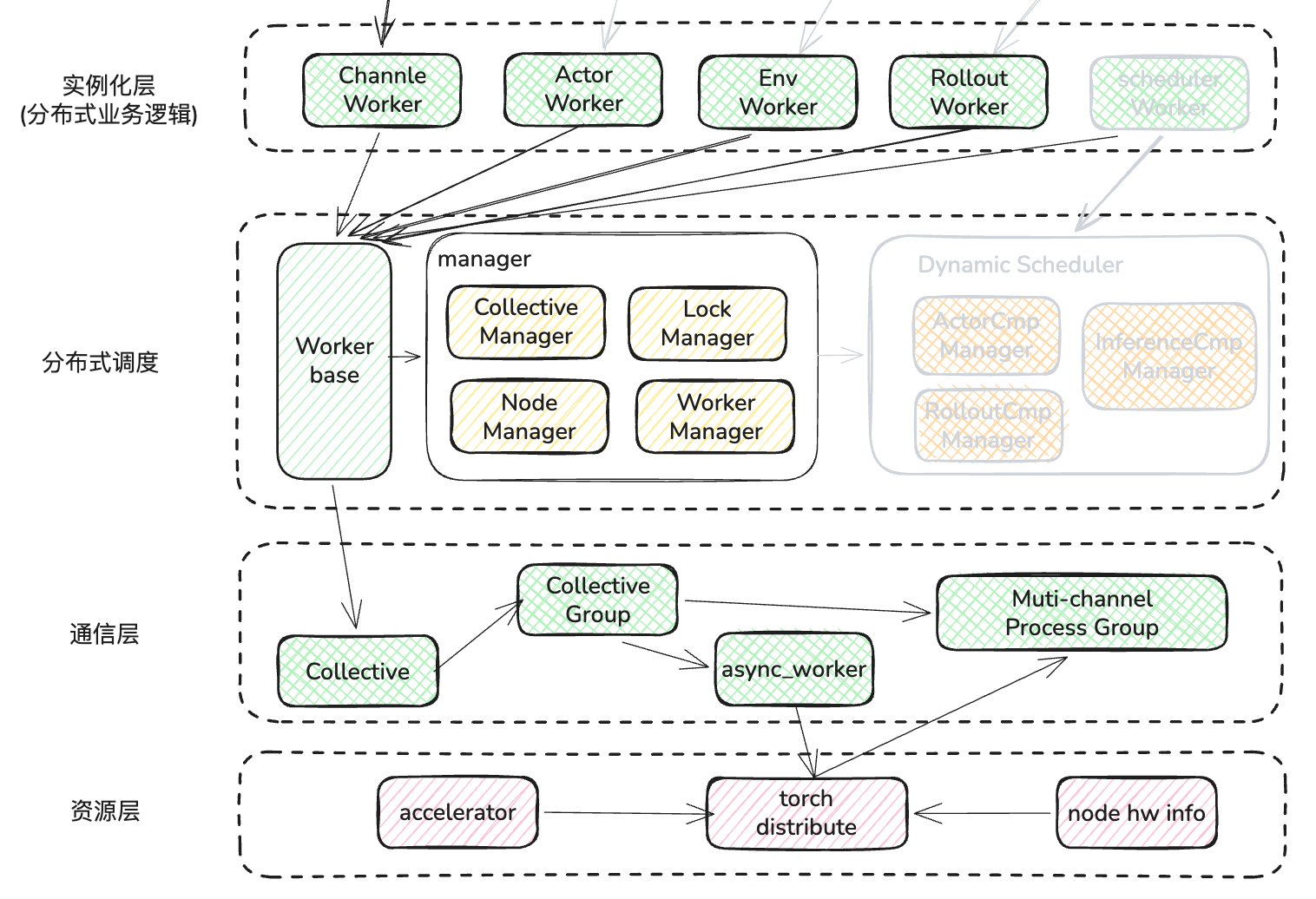
所有业务层的 worker 都是继承与 Worker Base 的这个基类,那么我们就通过分析这个基类来了解细节
2.1 Worker 创建
Worker 类定义如下,首先定义 WorkerMeta 类,它会将所有子类方法的异常捕获,并日志留痕处理
# 此处定义元类,在新建时,为目标子类的方法进行装饰
class WorkerMeta(type):
    """Metaclass to capture failures in worker classes."""

    def __new__(cls, name: str, bases: tuple[type], attrs: dict[str, Any]):
        """Wrap the function to catch SystemExit exceptions."""
        for attr_name, attr_value in attrs.items():
            if callable(attr_value):
                attrs[attr_name] = cls._catch_failure_for_cls_func(
                    name, attr_name, attr_value
                )
        return super().__new__(cls, name, bases, attrs)

    # 对每个方法都添加exception 捕获,并打印堆栈
    @classmethod
    def _catch_failure_for_cls_func(cls, cls_name, func_name: str, func: Callable):
        """Wrap a try...except SystemExit block around the class function calls."""
        # Get all callable methods of the WorkerGroup class and the Worker class
        if func_name.startswith("_") and func_name != "__init__":
            return func

        def func_wrapper(func: Callable):
            @functools.wraps(func)
            def sync_func(*args, **kwargs):
                try:
                    return func(*args, **kwargs)
                except SystemExit:
                    # Catch SystemExit and log the error
                    raise RuntimeError(
                        f"SystemExit caught in {cls_name}'s function {func.__name__}, traceback is below: {traceback.format_exc()}"
                    )

            @functools.wraps(func)
            async def async_func(*args, **kwargs):
                try:
                    return await func(*args, **kwargs)
                except SystemExit:
                    # Catch SystemExit and log the error
                    raise RuntimeError(
                        f"SystemExit caught in {cls_name}'s function {func.__name__}, traceback is below: {traceback.format_exc()}"
                    )
            # 协程方法返回,异步装饰器
            if inspect.iscoroutinefunction(func):
                return async_func
            # 异步生成器(yield)方法, worker base不支持
            elif inspect.isasyncgenfunction(func):
                raise NotImplementedError(
                    f"Async generator function {func.__name__} is not supported when CATCH_FAILURE is enabled."
                )
            else:
                # 同步方法返回,同步装饰器
                return sync_func

        return func_wrapper(func)

# 继承于元类
class Worker(metaclass=WorkerMeta):

    # 类静态全局变量
    PID = None
    current_worker = None
    logging.basicConfig()
    logger = logging.getLogger(Cluster.SYS_NAME)
    logger.setLevel(Cluster.LOGGING_LEVEL)
    # AcceleratorUtil内置了一个硬件类型(GPU/Robot) -> 硬件管理者的 map
    # get_accelerator_type会遍历检查目前所有支持的 GPU 信息,然后返回HardwareInfo的数组
    # 目前支持的GPU type有: NV_GPU/AMD_GPU/INTEL_GPU/NPU/MUSA_GPU,
    # MUSA_GPU依赖 摩尔线程的 pymtml 包,其他 GPU 探测依赖 ray的accelerators包
    accelerator_type = AcceleratorUtil.get_accelerator_type()
    # 将GPU type 转化成 torch 硬件类型,对应关系如下
    # NV_GPU -> torch.cuda
    # AMD_GPU -> torch.cuda
    # NPU -> torch.npu
    # INTEL_GPU -> torch.xpu
    # MUSA_GPU -> torch,musa (需要安装摩尔线程提供的 pytorch 包)
    torch_platform = AcceleratorUtil.get_torch_platform(accelerator_type)
    # 字符串版的torch_platform
    torch_device_type = AcceleratorUtil.get_device_type(accelerator_type)

    def __new__(cls, *args, **kwargs):
      # 上文以说明,用于异常捕获
      instance = super().__new__(cls)
      # ray node自带的环境变量
      cluster_node_rank = os.environ.get("CLUSTER_NODE_RANK", None)

      if cluster_node_rank is not None and "ActorClass(" not in cls.__name__:
          # 从继承 worker group 环境变量中获取当前 rank 信息,此步在 Actor 实例化时进行
          # 也可以通过RLINF_EXT_MODULE环境变量中指定需要额外导入的包
          instance._env_setup_before_init()
          instance._register_signal_handlers()
          # 开启 ptrace 能力,此段代码来自vllm
          instance._enable_ptrace()

      return instance
2.2 Worker init
到此,前期准备部分已经完成了,那么接下来进行 worker 的 init
def __init__(
    self,
    parent_address: Optional[WorkerAddress] = None,
    world_size: Optional[int] = None,
    rank: Optional[int] = None,
):
    # rank可能是树状结构组成的,当某个一级 worker 创建子 worker 时,逻辑上不把它当成 ray actor 实例
    if rank is not None and parent_address is not None and world_size is not None:
        # The Worker is not a Ray actor
        self._rank = rank
        self._worker_address = parent_address.get_child_address(rank)
        self._world_size = world_size
        self._worker_name = self._worker_address.get_name()
        # Forked process might inherit the environment variable RAY_ACTOR, but it is not a Ray actor.
        self._is_ray_actor = False
    else:
        self._is_ray_actor = True

    # 检查 GPU 的 rank 值
    if self._is_ray_actor and not hasattr(self, "_local_accelerator_rank"):
        raise RuntimeError(
            "You may have mistakenly initialized the Worker class directly without `create_group` and `launch`. Please ensure a worker class is not instantiated on the main process directly like `Worker()`, but `Worker.create_group().launch()`."
        )

    Worker.PID = os.getpid()
    self._thread = threading.current_thread()
    self._stacklevel = 4 if self._is_ray_actor else 3

    # Reset Cluster.NAMESPACE for this Worker process according to the environment variable
    namespace = os.environ.get("CLUSTER_NAMESPACE", None)
    assert namespace is not None, (
        "CLUSTER_NAMESPACE environment variable must be set before initializing Worker."
    )
    Cluster.NAMESPACE = namespace

    # Initialize Ray if not already initialized
    if not ray.is_initialized():
        ray.init(
            address="auto",
            namespace=Cluster.NAMESPACE,
            logging_level=Cluster.LOGGING_LEVEL,
        )

    # 从环境变量中获取并设置address
    if self._is_ray_actor and parent_address is not None:
        # The Worker is a Ray actor launched inside a Worker
        self._worker_address = parent_address.get_child_address(self._rank)
        self._worker_name = self._worker_address.get_name()
        os.environ["WORKER_NAME"] = self._worker_name
    self._group_name = self._worker_address.get_parent_address().get_name()

    # Initialize global locks
    from .lock import DeviceLock, PortLock

    # 初始化gpu、port 分配时的互斥所锁
    self._device_lock = DeviceLock(self)
    self._port_lock = PortLock(self)

    # Setup local rank and world size
    self._setup_local_rank_world_size()

    # 根据可见设备的环境变量,从 node 上挑选 GPU rank
    self._setup_accelerator_info()

    # Configure logging
    self._setup_logging()

    # Setup node group and hardware ranks
    self._setup_hardware()

    # 创建 worker info属性,方便后续worker manager查询
    self._setup_worker_info()

    # Init ray and managers
    self._manager_proxy = None
    self._collective = None
    # 将此worker info注册到全局的WorkerManager上
    # 创建self._collective,它为底层通信的模块
    self._setup_managers()

    # Setup MASTER_ADDR and MASTER_PORT 用于创建分布式通信时,交互信息
    self._setup_master_address_and_port()

    # Setup communication envs
    self._setup_comm_envs()

    self._lock = threading.Lock()
    Worker.current_worker = self
    self._has_initialized = True
至此,worker 初始化完成,这里再重点讲一下_setup_managers
def _setup_managers(self):
    """When the Worker is not a Ray actor, we need to initialize Ray if it is not already initialized."""
    from ..collective import Collective
    from ..manager import WorkerManager

    if (
        self._manager_proxy is None
        or self._collective is None
        or Worker.PID != os.getpid()
    ):
        # 获取全局WorkerManager:通过 manager name 查询 ray actor 得到引用
        self._manager_proxy = WorkerManager.get_proxy()
        # 注册addr+info
        self._manager_proxy.register_worker(self._worker_address, self._worker_info)
        # 创建Collective通信属性,用于底层广播数据使用
        self._collective = Collective(self)

        Worker.PID = os.getpid()
L16:创建了Collective类用于广播数据时的具体执行
2.3 Worker collective
class Collective:
    """The singleton class for managing and handling calls to local collective groups."""

    def __init__(self, cur_worker: Worker):

        self._name_group_map: dict[str, CollectiveGroup] = {}
        '''
        获取全局的CollectiveManager, 其功能包括
        - 管理所有的集体通信组(Collective Groups)。
        - 分配分布式训练所需的网络端口。
        - 协调不同 Worker 之间的“会师”(Rendezvous)信息
        '''
        self._coll_manager = CollectiveManager.get_proxy()
        # 获取全局的WorkerManger
        self._worker_manager = cur_worker.manager_proxy
        # 当前通信的 worker
        self._cur_worker_address = cur_worker.worker_address
        self._logger = cur_worker._logger

    # 当发送或者接收数据时,先创建临时的CollectiveGroup,用于多个WorkerAddress进行通信
    def create_collective_group(
        self, worker_addresses: list[WorkerAddress], group_name: Optional[str] = None
    ) -> CollectiveGroup:

        if group_name is None:
            # cg-actor_0-evn_1
            group_name = self._get_group_name(worker_addresses)

        # 存在缓存,直接使用
        if group_name in self._name_group_map:
            return self._name_group_map[group_name]

        # 查看全局 manager 中是否有缓存信息,不存在然会 none
        group_info = self._coll_manager.get_collective_group(group_name)
        # 创建CollectiveGroup
        self._name_group_map[group_name] = CollectiveGroup(
            group_info, self, group_name, worker_addresses, self._cur_worker_address
        )
        return self._name_group_map[group_name]
L34:核心代码是创建为 worker peer 创建CollectiveGroup,这个类内容较多,我一步步分析
class CollectiveGroup:

    def __init__(
        self,
        group_info: Optional[CollectiveGroupInfo],
        collective: "Collective",
        group_name: str,
        worker_addresses: list[WorkerAddress],
        cur_worker_address: WorkerAddress,
    ):
        self._group_info = group_info
        self._collective = collective
        self._group_name = group_name
        self._worker_addresses = worker_addresses
        self._cur_worker_address = cur_worker_address
        self._mc_group = None
        self._worker = Worker.current_worker
        self._coll_manager = CollectiveManager.get_proxy()
        self._logger = logging.getLogger(cur_worker_address.get_name())
        self._lock = threading.Lock()

        # 如果从全局 collective manager中为获取信息,则初始化
        if self._group_info is not None:
            #
            self._init_group()

        #
        self._send_comm_id_iter = itertools.count()
        self._recv_comm_id_iter = itertools.count()
        self._broadcast_comm_id_iter = itertools.count()

        # 发送队列
        self._send_work_queues = [
            CollectiveWorkQueue(CollectiveWorkQueue.SEND, self._logger)
            for _ in range(CollectiveGroup.POOL_SIZE)
        ]
        # 接收队列
        self._recv_work_queues = [
            CollectiveWorkQueue(CollectiveWorkQueue.RECV, self._logger)
            for _ in range(CollectiveGroup.POOL_SIZE)
        ]
        # 广播队列
        self.collective_work_queues = [
            CollectiveWorkQueue(CollectiveWorkQueue.BROADCAST, self._logger)
            for _ in range(CollectiveGroup.POOL_SIZE)
        ]

    def _init_group(self):
        if self._group_info is None:
            # 选择一个worker作为交互endpoint
            master_worker_address = self._worker_addresses[0]
            if self._cur_worker_address == master_worker_address:
                # Create the group if I'm the master worker
                workers: list[WorkerInfo] = []
                for address in self._worker_addresses:
                    worker_info = self._collective._get_worker_info_safe(address)
                    workers.append(worker_info)
                # 获取ip地址
                master_addr = workers[0].node_ip
                # 组信息主要包括 master addr、所有worker info、group name
                group_info = CollectiveGroupInfo(
                    group_name=self._group_name,
                    workers=workers,
                    master_addr=master_addr,
                )
                # 向全局coll_manager注册组信息
                self._coll_manager.register_collective_group(group_info)
                self._logger.debug(
                    f"Collective group {self._group_name} created with workers: {[worker.get_name() for worker in self._worker_addresses]}"
                )
            else:
                # 如果不是第一个 worker,则被动等待组信息注册,这样所有 worker 都有对方的信息了
                group_info = self._collective._get_group_info_safe(self._group_name)
                self._logger.debug(
                    f"Collective group {self._group_name} found with workers: {[worker.get_name() for worker in self._worker_addresses]}"
                )

            self._group_info = group_info

        if self._mc_group is None:
            self._rank = -1
            for i, worker in enumerate(self._group_info.workers):
                if worker.address == self._cur_worker_address:
                    # 查找当前worker的索引
                    self._rank = i
                    break
            # 从而确定对方的rank,从代码中可以判断,group 只支持两个 worker 的通信(P2P)
            self._peer_rank = 1 if self._rank == 0 else 0

            from .multi_channel_pg import MultiChannelProcessGroup
            # 此处创建了MultiChannelProcessGroup,从参数中可以看出,目前设定是 POOL_SIZE=1 的单 channel
            self._mc_group: MultiChannelProcessGroup = MultiChannelProcessGroup(
                cur_rank=self._rank,
                num_channels=CollectiveGroup.POOL_SIZE,
                group_info=self._group_info,
                logger=self._logger,
            )
L92: 在向 ColleManager注册了全局组信息后,创建了MultiChannelProcessGroup,这个类将根据 worker 和peer worker 的 gpu情况综合判断,使用哪种torch.dist.ProcessGroup最为高效,并根据 master ip 和 port 协商,建立 P2P 连接。
现在万事俱备,我们回到Worker Base,看看当 send 或者 revc 时,这些组件是如何配合工作的。
2.4 Worker send
def _get_collective_group(self, peer_addr: WorkerAddress):
    """Get a collective group for communication with a peer worker."""
    workers = [self._worker_address, peer_addr]
    # Ensure the order is the same with the same two ranks
    workers = sorted(workers, key=lambda x: x.get_name())
    self._setup_managers()
    with self._lock:
        return self._collective.create_collective_group(workers)

def send(
    self,
    object: torch.Tensor | list[torch.Tensor] | dict[str, torch.Tensor] | Any,
    dst_group_name: str,
    dst_rank: int | list[int],
    async_op: bool = False,
    options: Optional["CollectiveGroupOptions"] = None,
    piggyback_payload: Optional[Any] = None,
):
    dst_addr = WorkerAddress(dst_group_name, ranks=dst_rank)
    group = self._get_collective_group(dst_addr)
    return group.send(
        object=object,
        async_op=async_op,
        options=options,
        piggyback_payload=piggyback_payload,
   )

def recv(
    self,
    src_group_name: str,
    src_rank: int | list[int],
    async_op: bool = False,
    options: Optional["CollectiveGroupOptions"] = None,
):
    src_addr = WorkerAddress(src_group_name, ranks=src_rank)
    group = self._get_collective_group(src_addr)
    return group.recv(async_op=async_op, options=options)
- Worker的 send / recv 都比较简单
- 通过 rank 和 gourp name 确定peer worker 的 addr,
- 然后就是组成 worker pair,调用 collective 的create_collective_group(2.3节中已讲到),创建通信组CollectiveGroup
- 调用通信组进行数据的收发
那么我们接着看 CollectiveGroup 的 send 如何实现
def send(
  self,
  object: torch.Tensor | list[torch.Tensor] | dict[str, torch.Tensor] | Any,
  async_op: bool = False,
  options: Optional[CollectiveGroupOptions] = None,
  piggyback_payload: Optional[Any] = None,
) -> Optional[AsyncWork]:
  # ...
  send_comm_id = next(self._send_comm_id_iter)
  # 解析发送数据的类型,目前支持的几种 tensor 的类型结构包括:
  # torch.Tensor/list/dict/dataclass
  # 最终所有数据会分类成cpu_tensor 和 gpu_tensor 数据,封装在tensor_data中
  object_type, tensor_data = self._get_object_info(object)

  # 这里会创建一个异步任务来执行_atomic_send
  send_work = AsyncFuncWork(
      self._atomic_send,
      object=object,
      comm_id=send_comm_id,
      object_type=object_type,
      tensor_data=tensor_data,
      options=options,
      piggyback_payload=piggyback_payload,
  )

  # Capture CUDA event of the main stream if sending accelerator tensors
  if tensor_data.has_accel_tensor:
      send_event = Worker.torch_platform.Event()
      send_event.record()
  else:
      send_event = None

  work_queue = self._send_work_queues[send_comm_id % CollectiveGroup.POOL_SIZE]
  # 异步通信,然后返回这个异步任务的句柄,传递给上层,上层代码会等待任务完成
  if async_op:
      work_queue.enqueue(send_work, send_comm_id, send_event)
      return send_work
  else:
      while not work_queue.done:
          continue
      # 同步通信需要等待完成再返回
      send_work(None)
      self._logger.debug(f"Sync send ID {send_comm_id} done")
      return send_work.wait()

def _atomic_send(
    self,
    object: torch.Tensor | list[torch.Tensor] | dict[str, torch.Tensor] | Any,
    comm_id: int,
    object_type: str,
    tensor_data: TensorData,
    options: Optional[CollectiveGroupOptions] = None,
    piggyback_payload: Optional[Any] = None,
) -> Optional[AsyncWork]:
    # 这里初始化 torch.distribute 的进程组
    self._init_process_group(options=options)
    # First send object type to the destination worker
    object_type_tensor = torch.tensor(object_type, dtype=torch.int, device="cpu")
    self._send(object_type_tensor, CollectiveGroup.CPU, comm_id)
    self._logger.debug(
        f"Sending object type {object_type} from {self._cur_worker_address.get_name()} in group {self._group_info.group_name}"
    )
    # 不同的 object type,数据传输的交互方式略有不同,所以这里会分别进行处理
    if object_type == CollectiveGroup.TENSOR:
        # Out-of-place tensor send/recv is done via tensor list send/recv with a list of one tensor
        return self._send_tensor_list(
            [object],
            comm_id,
            piggyback_payload=piggyback_payload,
            tensor_data=tensor_data,
        )
    elif object_type == CollectiveGroup.TENSOR_LIST:
        return self._send_tensor_list(
            object,
            comm_id,
            piggyback_payload=piggyback_payload,
            tensor_data=tensor_data,
        )
    elif object_type == CollectiveGroup.TENSOR_DICT:
        return self._send_tensor_dict(
            object,
            comm_id,
            tensor_data,
            piggyback_payload=piggyback_payload,
        )
    elif object_type == CollectiveGroup.DATACLASS_WITH_TENSORS:
        return self._send_tensor_dataclass(
            object,
            comm_id,
            tensor_data=tensor_data,
            piggyback_payload=piggyback_payload,
        )
    elif object_type == CollectiveGroup.OBJECT:
        return self._send_object(
            object, comm_id, piggyback_payload=piggyback_payload
        )
    else:
        raise ValueError(f"Unsupported object type: {object_type}")
L56:这里重点说一下init_process_group 方法,
def _init_process_group(
    self, options: Optional[CollectiveGroupOptions] = None
) -> dist.ProcessGroup:
    """Initialize the process group for collective operations."""
    # port lock
    with self._lock:
        # _init_group 2.3 节说过,向 collective manager 注册 group info,并创建 mc_pg类(_mc_group)
        self._init_group()
        if self._mc_group.is_initialized:
            return

        from ..cluster import Cluster

        if self._rank == 0:
            # 如果是master endpoint
            master_port = self._worker.acquire_free_port()
            # 创建并共享当前 port
            self._coll_manager.set_master_port_info(
                self._group_info.group_name, master_port
            )
        else:
            master_port = None
            count = 0
            while master_port is None:
                # peer endpint则获取master port
                master_port = self._coll_manager.get_master_port_info(
                    self._group_info.group_name
                )
                time.sleep(0.001)
                count += 1
                if count % Cluster.TIMEOUT_WARN_TIME == 0:
                    self._logger.warning(
                        f"Waiting for master port for collective group {self._group_info.group_name} to be set for {count // 1000} seconds"
                    )

        self._logger.debug(
            f"Initializing process group for collective group {self._group_info.group_name}, master address {self._group_info.master_addr}, master port {master_port}, world size {self._group_info.world_size}, rank {self._rank}"
        )
        # 根据上面创建的_mc_groupm, 通过torch.distributed交换 worker pair 的信息,建立连接
        self._mc_group.init(
            init_method=f"tcp://{self._group_info.master_addr}:{master_port}",
            world_size=self._group_info.world_size,
            rank=self._rank,
            group_name=self._group_info.group_name,
            options=options,
        )

        self._logger.debug(
            f"Process group {self._group_info.group_name} initialized successfully."
        )

        if self._rank == 0:
            # Avoid using the same master port for the next group
            self._coll_manager.reset_master_port_info(self._group_info.group_name)
L40:这里重点注意_mc_group的 init 方法。这里不是直接调用 torch.distributed.init_process_group ,它内部会先根据硬件环境(CUDA/MUSA/CPU)选择合适的 Backend(如 NCCL 或 Gloo),并可能创建多个通信通道(Channel)以提高吞吐量(可以通过 channel.POOL来调解)
CollectiveGroup接下来所有的 _send_xxx最终都会调用_send 方法发送实体数据
 def _send(
        self, tensor: torch.Tensor, device: str, comm_id: int, async_op: bool = False
):
    """Wrap the actual send operation to hide internal API changes."""
    channel_id = comm_id % CollectiveGroup.POOL_SIZE
    # 实质上通过comm_id负载均衡到具体的通道队列上
    # 然后调用MultiChannelProcessGroup的 send 方法
    return self._mc_group.send(
        tensor=tensor, device=device, channel_id=channel_id, async_op=async_op
    )

class MultiChannelProcessGroup:

   def send(
        self, tensor: torch.Tensor, device: str, channel_id: int, async_op: bool = False
    ) -> Optional[AsyncWork]:
        """Send a tensor via a channel.

        Args:
            tensor (torch.Tensor): The tensor to send.
            device (str): The device type, either CollectiveGroup.CUDA or CollectiveGroup.GLOO.
            channel_id (int): The channel ID to use for sending the tensor.
            async_op (bool): Whether to perform the operation asynchronously.

        """
        if not self._is_initialized:
            raise RuntimeError("MultiChannelProcessGroup is not initialized")
        if channel_id < 0 or channel_id >= self._num_channels:
            raise ValueError(
                f"Invalid channel_id: {channel_id}. Must be in range [0, {self._num_channels - 1}]"
            )

        # NOTE: GLOO backend doesn't support dist.Work.get_future, use broadcast to simulate send/recv instead
        if self._no_accel_ccl and device == CollectiveGroup.ACCEL:
            # Transfer to CPU if accel CCL is not available
            tensor = tensor.to("cpu")
        # 判断是走NCCL(GPU)还是GLOO(GPU)模式
        group = (
            self._send_accel_ccl_process_groups[channel_id]
            if device == CollectiveGroup.ACCEL and not self._no_accel_ccl
            else self._send_gloo_process_groups[channel_id]
        )
        # 确定模式后,通过_broadcast发送数据
        work = self._broadcast(
            tensor,
            src=self._cur_rank,
            group=group,
            async_op=async_op,
        )
        if work:
            return AsyncCollWork(work)

  def _broadcast(
      self,
      tensor: torch.Tensor,
      src: int,
      group: dist.ProcessGroup = None,
      async_op: bool = False,
  ):
      """Broadcast a tensor in the given process group.

      This is modified version of dist.broadcast to avoid checking default group both in the broadcast and in the _exception_logger annotator's get_msg_dict function.
      """
      try:
          from torch.distributed.distributed_c10d import (
              BroadcastOptions,
              _check_single_tensor,
              _rank_not_in_group,
              _warn_not_in_group,
              get_group_rank,
          )

          _check_single_tensor(tensor, "tensor")
          if _rank_not_in_group(group):
              _warn_not_in_group("broadcast")
              return

          opts = BroadcastOptions()
          opts.rootRank = src
          opts.rootTensor = 0
          opts.asyncOp = async_op

          if group is None:
              raise ValueError("Group must be specified for broadcast operation")
          group_src_rank = get_group_rank(group, src)
          opts.rootRank = group_src_rank
          # 具体执行distributed_c10d广播数据
          work = group.broadcast([tensor], opts)
          # 此操作可以设置成同步 或 异步,因此返回值不同
          if async_op:
              return work
          elif work is not None:
              work.wait()
      except Exception as error:
          pg_name = dist._get_process_group_name(group)
          msg = f"Broadcast failed on ProcessGroup {pg_name} rank {self._cur_rank} with error: {error}. Args - tensor: {tensor}, src: {src}, group: {group}, async_op: {async_op}."
          self._logger.error(msg)
2.4 Worker recv
对于接收,和 send 类似,我们直接着看 CollectiveGroup 的 _atomic_recv 如何实现
此时,我们调用 revc 时,已经触发了peer worker 的 send 动作,因此我们只需要直接接收即可。
def _atomic_recv(
    self,
    comm_id: int,
    current_device: Optional[int],
    options: Optional[CollectiveGroupOptions] = None,
) -> AsyncWork | torch.Tensor | list[torch.Tensor] | dict[str, torch.Tensor] | Any:
    """Atomic recv implementation."""
    if current_device is not None:
        Worker.torch_platform.set_device(current_device)
    # 已讲过,略过
    self._init_process_group(options=options)

    # First recv object type
    object_type_tensor = torch.empty(1, dtype=torch.int, device="cpu")
    self._recv(object_type_tensor, CollectiveGroup.CPU, comm_id)

    object_type = object_type_tensor.item()
    self._logger.debug(
        f"Receiving object type {object_type} from Rank {self._peer_rank} in group {self._group_info.group_name}"
    )
    if object_type == CollectiveGroup.TENSOR:
        tensor, pb_data = self._recv_tensor_list(comm_id)
        assert len(tensor) == 1, (
            f"Expected to receive one tensor but got {len(tensor)} tensors from Rank {self._peer_rank} in group {self._group_info.group_name}"
        )
        data = tensor[0]
    elif object_type == CollectiveGroup.TENSOR_LIST:
        data, pb_data = self._recv_tensor_list(comm_id)
    elif object_type == CollectiveGroup.TENSOR_DICT:
        data, pb_data = self._recv_tensor_dict(comm_id)
    elif object_type == CollectiveGroup.DATACLASS_WITH_TENSORS:
        data, pb_data = self._recv_tensor_dataclass(comm_id)
    elif object_type == CollectiveGroup.OBJECT:
        data, pb_data = self._recv_object(comm_id)
    else:
        raise ValueError(f"Unsupported object type: {object_type}")
    if pb_data is not None:
        return data, pb_data
    else:
        return data
所有的 _recv_xxx 最终都会调用_recv接收实体数据
def _recv(
    self, tensor: torch.Tensor, device: str, comm_id: int, async_op: bool = False
):
    """Wrap the actual recv operation to hide internal API changes."""
    channel_id = comm_id % CollectiveGroup.POOL_SIZE
    return self._mc_group.recv(
        tensor=tensor, device=device, channel_id=channel_id, async_op=async_op
    )

class MultiChannelProcessGroup:

def recv(
    self, tensor: torch.Tensor, device: str, channel_id: int, async_op: bool = False
) -> Optional[AsyncWork]:
    """Receive a tensor from a peer rank.

    Args:
        tensor (torch.Tensor): The tensor to receive.
        device (str): The device type, either CollectiveGroup.CUDA or CollectiveGroup.GLOO.
        channel_id (int): The channel ID to use for receiving the tensor.
        async_op (bool): Whether to perform the operation asynchronously.

    """
    if not self._is_initialized:
        raise RuntimeError("MultiChannelProcessGroup is not initialized")
    if channel_id < 0 or channel_id >= self._num_channels:
        raise ValueError(
            f"Invalid channel_id: {channel_id}. Must be in range [0, {self._num_channels - 1}]"
        )

    # NOTE: GLOO backend doesn't support dist.Work.get_future, use broadcast to simulate send/recv instead
    recv_tensor = tensor
    if self._no_accel_ccl and device == CollectiveGroup.ACCEL:
        # 如果 NCCL不可用,曲线救国,将接收到 recv_tensor 放到 CPU 上
        recv_tensor = torch.empty_like(tensor, device="cpu")
    # 获取目标类型的torch.distributed.ProcessGroup
    group = (
        self._recv_accel_ccl_process_groups[channel_id]
        if device == CollectiveGroup.ACCEL and not self._no_accel_ccl
        else self._recv_gloo_process_groups[channel_id]
    )
    # 从_peer_rank广播数据到本地
    work = self._broadcast(
        recv_tensor,
        src=self._peer_rank,
        group=group,
        async_op=async_op,
    )

    if async_op:
        work = AsyncCollWork(work)
        return work.then(self._copy_to_accel_tensor, device, tensor, recv_tensor)
    else:
        self._copy_to_accel_tensor(device, tensor, recv_tensor)
至此,我们将 worker 的通信分层解析完毕,这部分是 RLinf 中最为复杂的逻辑,也是高效实现 P2P 通信的核心。
3. 总结
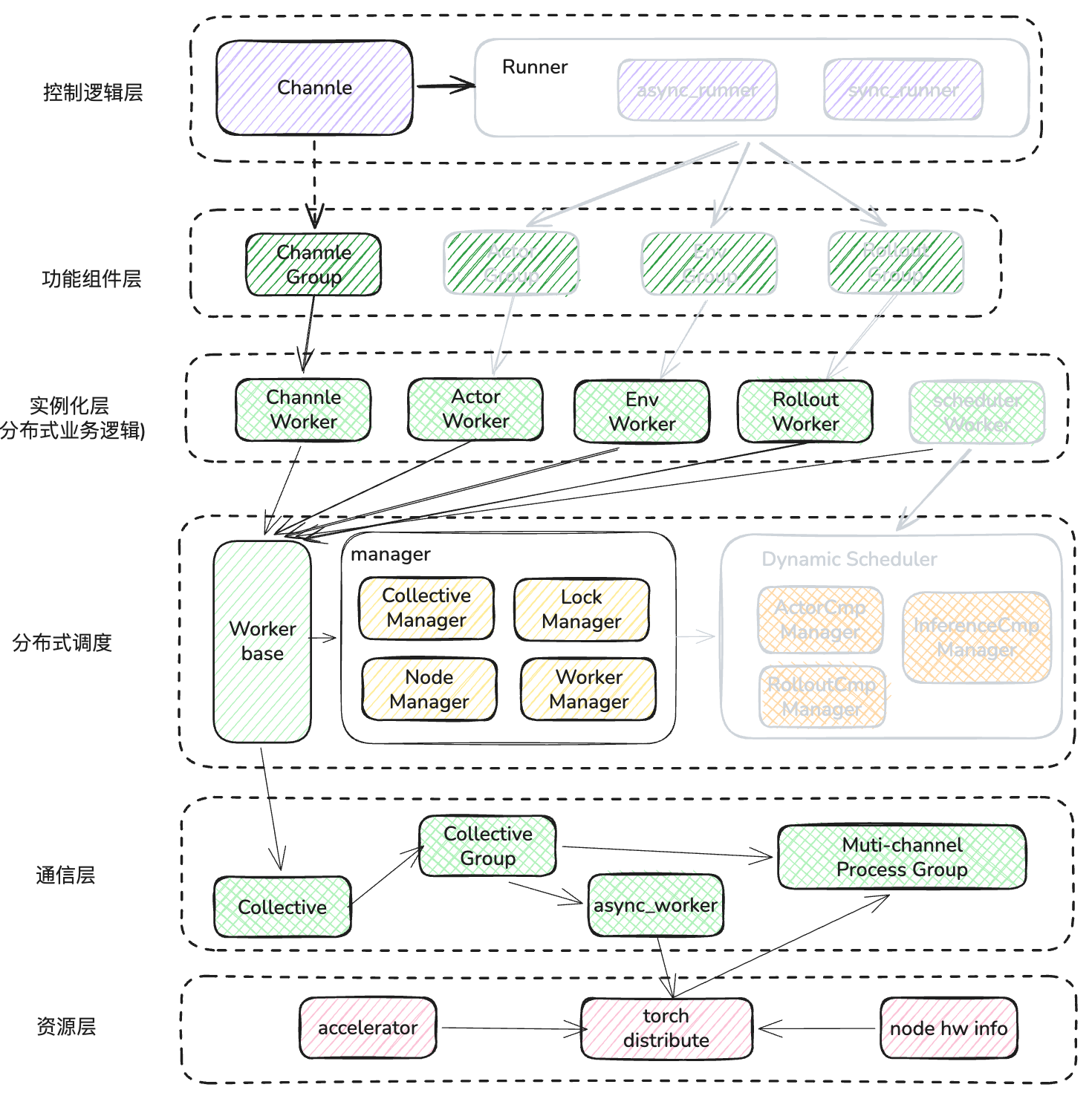
- 本章内容重点讲述了channel 是如何构建的,总结出其实它就是一个封装后的 channel worker,已经 channel 在 worker 间的寻址逻辑。
- 接下来详细讲解worker 的通信逻辑、组件依赖关系和底层通信的原理,并举例了 send 和 recv 时的调用逻辑。
如图所示:
下一篇会从 开始介绍 RLinf 的另外一个主打功能,动态调度器,看看 RLinf 是如何在 DP+PP+TP的环境中使用动态调度器,来提升 GPU的利用率的。